> For the complete documentation index, see [llms.txt](https://docs.taskade.com/llms.txt). Markdown versions of documentation pages are available by appending `.md` to page URLs; this page is available as [Markdown](https://docs.taskade.com/help/account-management/credits-and-billing.md).
# Credits & Billing
Understand how Taskade AI credits work, what drives app costs, credit pack pricing, and Auto Top-Up that refills your balance before agents run dry.
Understand how AI credits work in Taskade, how credit packs are priced, and how Auto Top-Up keeps your workflows running.
***
## Table of Contents
* [How AI Credits Work](#how-ai-credits-work)
* [Free Credits](#free-credits)
* [Paid Plan Credits](#paid-plan-credits)
* [What Your App Will Cost](#what-your-app-will-cost)
* [Credit Packs](#credit-packs)
* [Auto Top-Up](#auto-top-up)
* [Model-Specific Pricing](#model-specific-pricing)
* [Viewing Your Usage](#viewing-your-usage)
* [What Happens When You Run Out](#what-happens-when-you-run-out)
* [FAQ](#faq)
* [Related](#related)
***
## How AI Credits Work
Every AI request in Taskade — prompting an agent, running an automation with AI, generating a Taskade Genesis app — consumes credits. The credit cost depends on the model:
* **Lightweight models** cost fewer credits per request.
* **Frontier models** (top-tier reasoning models) cost more.
* **Auto mode** picks a model based on your plan tier and the complexity of the task.
Business-plan users and above get auto-routing to top-tier frontier models, so you don't need to manually pick the right model for each task.
***
## Free Credits
Every user — including free-tier — gets a baseline allocation of AI credits to explore Taskade's AI features.
* Free-tier users can purchase additional credits directly without upgrading to a paid plan.
* Advanced AI features are accessible to everyone, not just paid plans.
{% hint style="info" %}
Exact free-tier allocation may change. Check the [pricing page](https://www.taskade.com/pricing) for current numbers.
{% endhint %}
***
## Paid Plan Credits
Paid plans include monthly premium credits that reset on your billing cycle.
| Plan tier | Monthly credits | Key benefit |
| ---------- | ---------------------------------------------------------- | ----------------------------- |
| Pro | Premium monthly allowance | Personal productivity |
| Business | Higher monthly allowance + auto-routing to frontier models | Team use, complex AI tasks |
| Max | Higher allowance with headroom for bursty AI workloads | Heavy generation, large teams |
| Enterprise | Custom allowance + admin controls | Organization-wide deployments |
{% hint style="info" %}
Exact credit amounts per tier may change. See the [pricing page](https://www.taskade.com/pricing) for current allocations.
{% endhint %}
Max and Enterprise plans get refined credit limits designed for bursty workloads — you won't get throttled mid-task during a heavy generation run.
***
## What Your App Will Cost
If you're building and running a real app on Genesis, the question isn't "how many credits does one request cost" — it's "what in my app burns credits, and how much will it burn as I grow." Use this as a decision guide. For exact, current per-request numbers, always check the in-app model picker; published figures drift as models and pricing change.
### What drives your credit use
| What consumes credits | What drives the cost (relative) |
| -------------------------------------- | ------------------------------------------------------------------------------------------------------------------------------------------------------------- |
| **Genesis app generation & iteration** | Heaviest up front, while you build. Each generate and each "edit with AI" pass costs credits; settles down once the app is stable. |
| **AI automation steps** | Scales with how often your automations run and how many AI steps each run includes. A trigger that fires all day costs more than one that fires occasionally. |
| **An agent answering end-users** | Scales with the number of people using your published app and how chatty each session is. This is the line item that grows as your app gets traffic. |
| **Agent / Taskade EVE chat** | Scales with how much you and your team use AI assistance day to day — drafting, summarizing, asking questions in your workspace. |
Steps that don't call AI — plain forms, stored data, non-AI automation actions — don't draw from your credit balance.
### Right-size it
* **Low usage** — You're building for yourself or a small team, with light traffic and occasional automations. A personal paid tier (Pro direction) is usually enough; top up with a credit pack during a build sprint.
* **Medium usage** — A team relies on the app, automations run regularly, and a handful of end-users hit your agent daily. Lean toward the Business tier, which also auto-routes to frontier models so you don't manage model choice per task.
* **High usage** — A public-facing app with steady traffic, an agent answering many end-users, and automations firing throughout the day. Lean toward Max or Enterprise, which are tuned for bursty, high-volume AI workloads without mid-task throttling.
Don't over-buy on day one. Watch your [usage page](#viewing-your-usage) for the first month, then size to what your app actually draws.
### Keep your app from running dry
If real customers use your published app, an agent that runs out of credits mid-session is the worst time to find out. Turn on [**Auto Top-Up**](#auto-top-up) so your balance refills automatically before it hits zero — your customer-facing agent keeps answering instead of stalling on an out-of-credits screen.
***
## Credit Packs
Credit packs are one-time purchases on top of your monthly allocation.
* **Volume-tiered pricing** — bigger packs come with bigger bonuses.
* **Credits never expire on paid plans** — top up once, use over time.
* Purchases appear in the workspace activity log for audit visibility.
Use packs when you expect a heavy AI month — during a product launch, a big content sprint, or a large Genesis app build.
***
## Auto Top-Up
Auto Top-Up prevents you from running out of credits in the middle of a workflow.
### How It Works
1. Set a **minimum balance threshold** (e.g., 500 credits).
2. Set a **top-up amount** (e.g., 5,000 credits).
3. When your balance drops below the threshold, Taskade automatically purchases the top-up amount using your stored payment method.
### Setting It Up
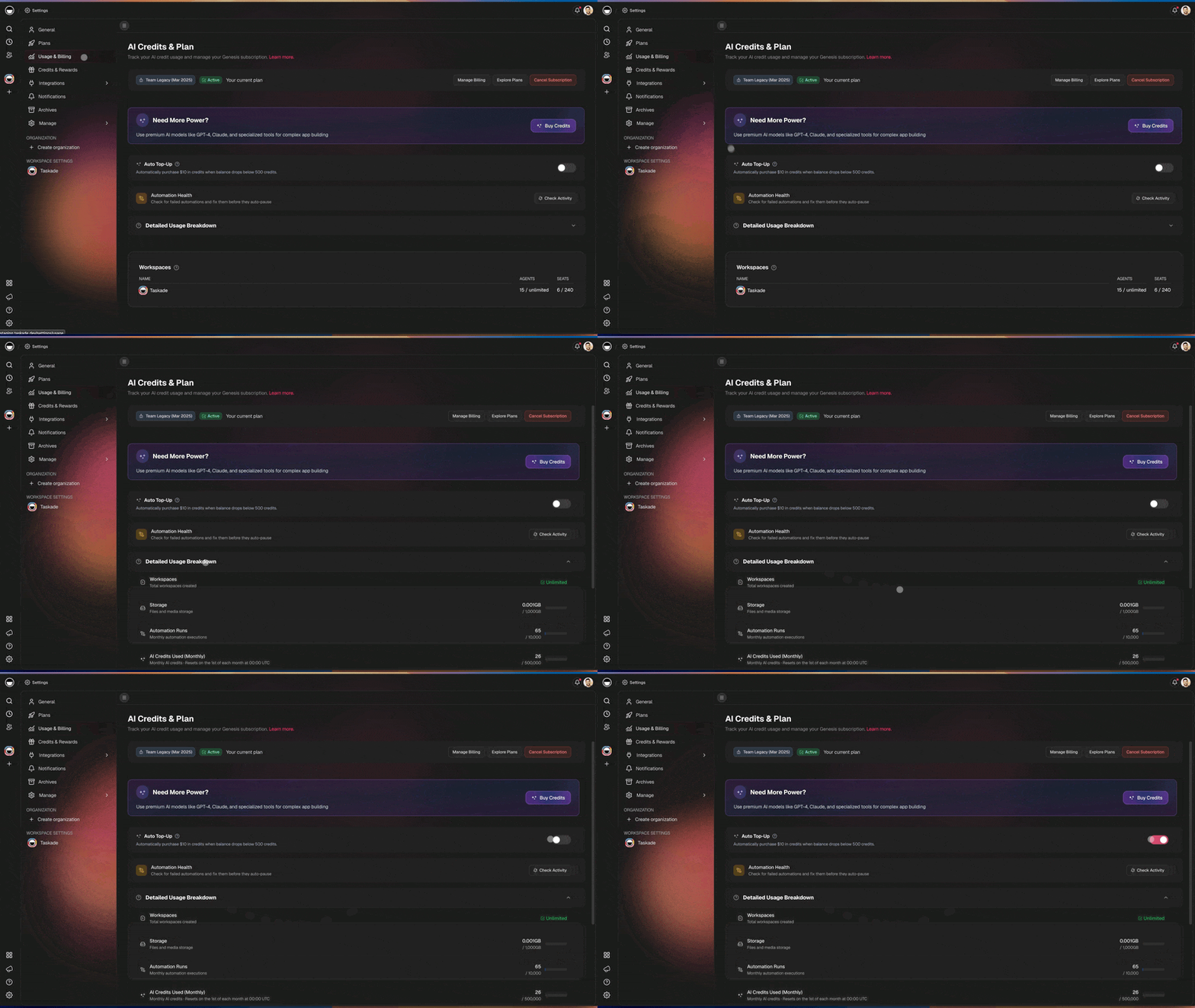
1. Go to **Settings** → **Billing** → **Credits**.
2. Toggle **Auto Top-Up** on.
3. Enter your minimum balance and top-up amount.
4. Confirm your payment method.
{% hint style="warning" %}
Auto Top-Up charges your payment method automatically when triggered. Set a reasonable threshold and top-up amount to match your expected usage.
{% endhint %}
Auto Top-Up is available on all plans that support AI credits.
***
## Model-Specific Pricing
Each AI model has its own credit cost per request. Pricing is adjusted periodically to track provider costs — Claude Sonnet 4.6 is priced at 110 credits per request, for example.
* You can see the current per-model credit cost in the model picker before selecting a model.
* Auto mode uses plan-aware routing to pick a cost-appropriate model for each request.
* For the authoritative current list, check the in-app model picker.
***
## Viewing Your Usage
Taskade surfaces credit usage in several places.
* **Usage page** in your account settings shows monthly credit consumption.
* **Workspace activity log** records every credit pack purchase.
* **Per-agent usage analytics** show which agents consume the most credits.
* **Automation run reports** show credits used per run.
***
## What Happens When You Run Out
Taskade never silently fails an AI request due to insufficient credits.
* **Paid users**: You're routed to the upgrade or credit-pack screen.
* **Free users**: You're prompted to upgrade or buy a pack.
* **Out-of-credits error** surfaces cleanly in the UI — no mysterious silent drops.
{% hint style="info" %}
Public agent visitors never see internal billing errors. If your app's agent runs out of credits, external users see a neutral error message, not billing details.
{% endhint %}
{% hint style="info" %}
Building against the API? See the [REST API guide](/developers/comprehensive-api-guide.md) for rate limits and error-handling conventions when requests fail.
{% endhint %}
***
## FAQ
Do credits expire?
On paid plans, purchased credit packs don't expire. Monthly premium credits reset each billing cycle. Free-tier rules may differ — check the pricing page for current policy.
Can I refund unused credits?
Refund policies vary. Contact support for case-by-case review.
Does Auto Top-Up have a spending cap?
Auto Top-Up only triggers when your balance drops below your chosen threshold. The cap is effectively controlled by how often you hit that threshold. Monitor your usage page during the first month to tune the settings.
Which models use the fewest credits?
Lightweight models have the lowest per-request cost. The model picker shows current pricing for each available model.
Does a Genesis app clone cost me credits?
Cloning a Genesis app does not consume credits on its own. AI usage inside the cloned app consumes credits normally.
***
## Related
{% content-ref url="/pages/5LUXTzj6kqwi1jSIXdD4" %}
[Account Management](/help/account-management.md)
{% endcontent-ref %}
{% content-ref url="/pages/mEZzZUs3UFEQj39zEqzb" %}
[AI Features Overview](/ai-features/ai-features.md)
{% endcontent-ref %}
---
# Agent Instructions
This documentation is published with GitBook. GitBook is the documentation platform designed so that both humans and AI agents can read, navigate, and reason over technical content effectively. Learn more at gitbook.com.
## Querying This Documentation
If you need additional information that is not directly available in this page, you can query the documentation dynamically by asking a question.
Perform an HTTP GET request on the current page URL with the `ask` query parameter, and the optional `goal` query parameter:
```
GET https://docs.taskade.com/help/account-management/credits-and-billing.md?ask=&goal=
```
`ask` is the immediate question: it should be specific, self-contained, and written in natural language.
`goal` is optional and describes the broader end goal you are ultimately trying to accomplish on behalf of the user. GitBook uses it to tailor the answer towards what is most useful for that goal.
The response will contain a direct answer to the question and relevant excerpts and sources from the documentation.
Use this mechanism when the answer is not explicitly present in the current page, you need clarification or additional context, or you want to retrieve related documentation sections.